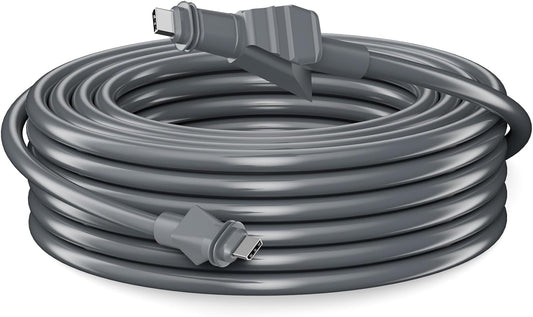
-
 メディアギャラリー
-
 メディアギャラリー
-
 メディアギャラリー
-
 メディアギャラリー
-
 メディアギャラリー
-
 メディアギャラリー
-
 メディアギャラリー
-
 メディアギャラリー


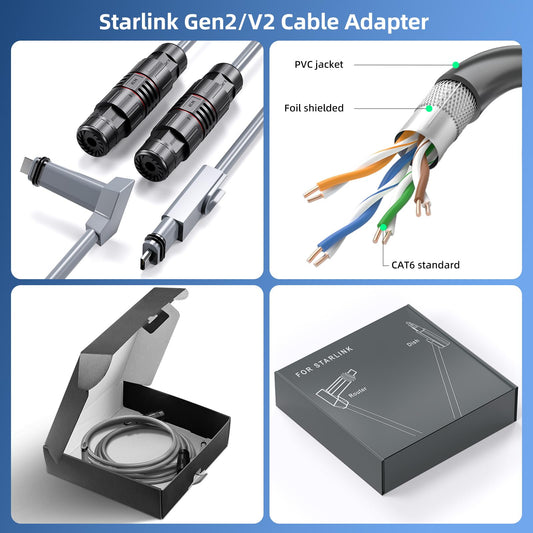
Starlink Standardムーブ イーサネットアダプター|Ethernet Adapter・第2世代・V2・RJ45 1Gbps・Standard Actuated対応
Starlink V2 Ethernet Adapter RJ45 Wired LAN 1Gbps, for Starlink Router and External Router Connection, Compatible with Standard Actuated Gen2 / Performance Gen1 Gen2
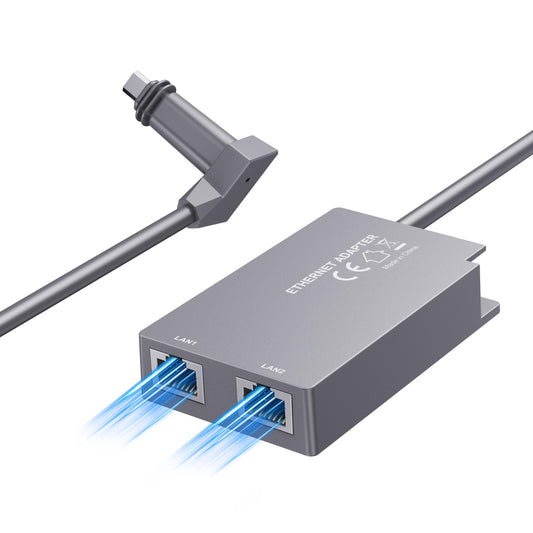
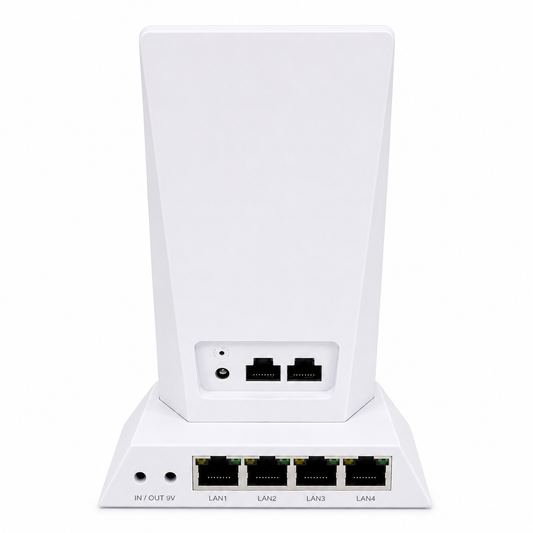
Starlink V2 Ethernetアダプターは、Starlink Standard Actuated(Gen2)およびPerformance(Gen1・Gen2)環境でRJ45有線LAN接続を追加できるアクセサリーです。StarlinkルーターとPC、市販ルーター、メッシュWiFi、スイッチングハブ、スマートTV、ゲーム機などを有線接続することで、Wi-Fiだけでは不安定になりやすい環境でも、より安定したネットワーク構築をサポートします。リモートワーク、オンライン会議、動画視聴、オンラインゲーム、店舗・事務所・業務用ネットワークにもおすすめです。
- セール価格
- ¥5,900 JPY
- 通常価格
-
- 通常価格
- ¥5,900 JPY
- 単価
- あたり


入荷通知

¥5,900
Product Description


Starlink Standardムーブ対応 イーサネットアダプター|Ethernet Adapter・第2世代・V2・RJ45有線LAN
本製品は、Starlink Standard Actuated(Gen2)およびPerformance(Gen1・Gen2)環境で使用できる、RJ45有線LAN対応のEthernetアダプターです。Starlinkルーターと各種機器を有線接続することで、Wi-Fiだけでは不安定になりやすい環境でも、より安定したネットワーク構築をサポートします。
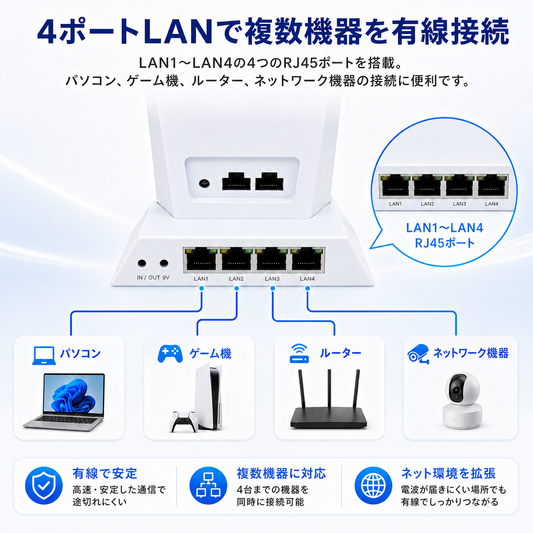
PC、Mac、ゲーム機、スマートテレビ、NAS、防犯カメラ、メッシュWiFi、市販ルーター、スイッチングハブ、業務用ネットワーク機器などをStarlink回線に有線接続したい場合に適しています。オンライン会議、動画視聴、リモートワーク、オンラインゲーム、店舗・事務所・倉庫・現場事務所など、通信の安定性を重視するシーンにおすすめです。
主な特徴
Starlink V2 / Gen2ルーター環境に対応
Starlink Standard Actuated(第2世代・Gen2・V2)およびPerformance(Gen1・Gen2)に対応。Starlink環境にRJ45有線LANポートを追加し、PCやルーターなどの機器を有線接続できます。
RJ45ギガビット有線LAN接続
最大1Gbpsの有線LAN接続に対応。PC、Mac、PS5、Xbox、スマートTV、NAS、スイッチングハブ、市販ルーターなど、各種LAN対応機器との接続に使用できます。
Wi-Fi干渉を避け、安定した通信環境を構築
Wi-Fi接続は、壁や距離、周辺電波の影響を受ける場合があります。有線LAN接続を利用することで、リモートワーク、Web会議、動画視聴、オンラインゲームなど、安定性を重視したい場面で使いやすくなります。
Starlinkルーター・市販ルーター・メッシュWiFi接続に便利
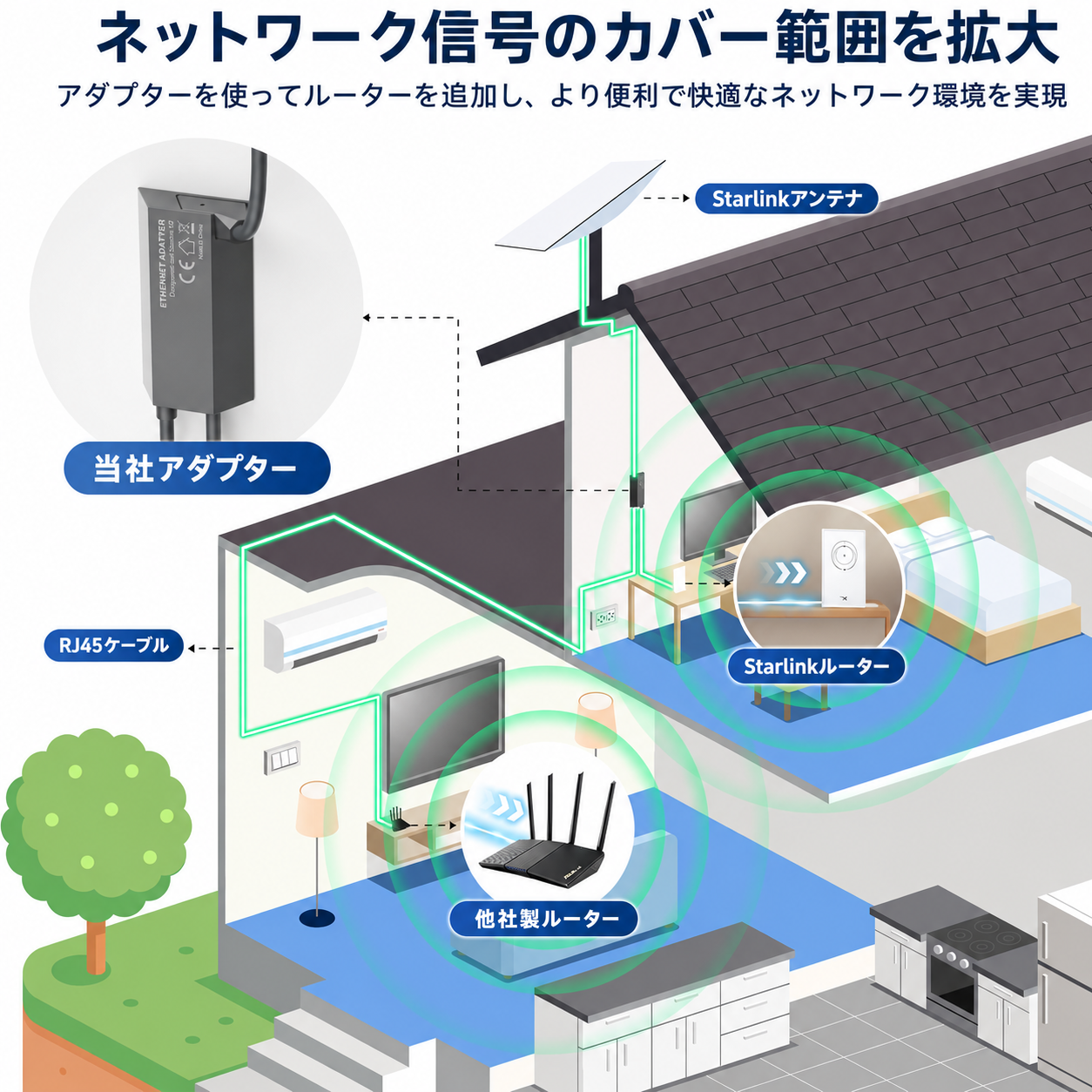
Starlink回線を家庭内やオフィス内のネットワークへ取り込みたい場合や、市販ルーター、外部ルーター、メッシュWiFi、スイッチングハブへ接続したい場合にも便利です。ネットワーク機器をまとめて管理したい環境にも適しています。
Plug & Playで簡単接続
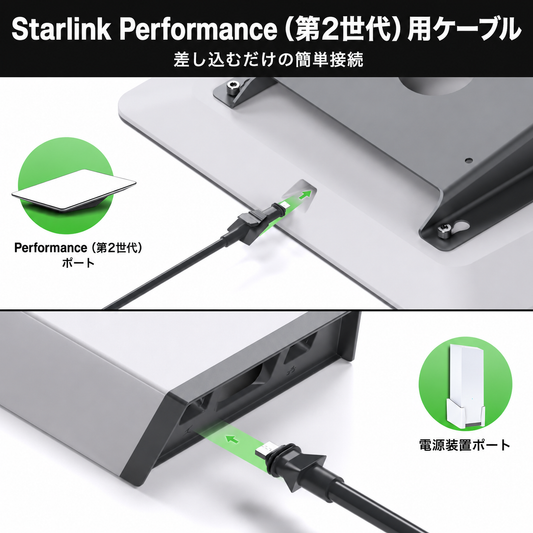
ドライバーのインストールや複雑な設定は不要です。Starlinkルーターとアンテナケーブルの間に本製品を接続し、RJ45ポートにLANケーブルを差し込むだけで、有線LAN環境を構築できます。
対応機種
- Starlink Standard Actuated(Gen2 / 第2世代・V2)
- Starlink Performance(Gen1 / 第1世代)
- Starlink Performance(Gen2 / 第2世代)
ご注意: Starlink Standard 4 / 4X、Starlink Mini、Standard Circularなど、上記以外のモデルには対応しない場合があります。ご購入前に、お使いのStarlink本体のモデルをご確認ください。
商品仕様
| 商品名 | Starlink V2 Ethernetアダプター |
|---|---|
| 接続ポート | RJ45 × 1 |
| 通信速度 | 最大1Gbps対応 |
| 対応機種 | Standard Actuated Gen2 / Performance Gen1 / Performance Gen2 |
| 接続方式 | 有線LAN / Ethernet |
| セットアップ | Plug & Play、ドライバー不要 |
| 主な接続機器 | PC、Mac、PS5、Xbox、スマートTV、NAS、市販ルーター、メッシュWiFi、スイッチングハブなど |
| 使用環境 | 屋内使用推奨 |
接続イメージ
- Starlinkルーターの電源をオフにします。
- Starlinkアンテナケーブルをルーターから取り外します。
- 本製品をStarlinkルーターに接続します。
- アンテナケーブルを本製品側に接続します。
- RJ45ポートにLANケーブルを接続し、PC・市販ルーター・スイッチングハブなどへ接続します。
- 電源を入れ、ネットワーク接続を確認します。
※対応機種や接続環境をご確認のうえ、お使いのStarlink本体に合った商品をお選びください。
※本製品はStarlink対応の周辺アクセサリーです。Starlinkの名称は、対応機種・適合性を示す目的で使用しています。
Starlink V2 Ethernet Adapter | Stable Wired Network Connection via RJ45 Ethernet
This product is an RJ45 Ethernet adapter designed for use with Starlink Standard Actuated Gen2 and Performance Gen1 / Gen2 environments. By connecting your Starlink router to devices via a wired Ethernet connection, it helps build a more stable network environment, especially in situations where Wi-Fi alone may be unstable.
It is suitable for connecting PCs, Macs, game consoles, smart TVs, NAS devices, security cameras, mesh WiFi systems, external routers, network switches and business network devices to your Starlink internet connection. Recommended for online meetings, video streaming, remote work, online gaming, shops, offices, warehouses, temporary site offices and other environments where stable communication is important.
Main Features
Compatible with Starlink V2 / Gen2 Router Environments
Compatible with Starlink Standard Actuated Gen2 and Performance Gen1 / Gen2. It allows you to add an RJ45 wired Ethernet port to your Starlink network environment and connect PCs, routers and other Ethernet-enabled devices.
RJ45 Gigabit Wired Ethernet Connection
Supports wired Ethernet connection up to 1Gbps. It can be used with PCs, Macs, PS5, Xbox, smart TVs, NAS devices, network switches, external routers and various LAN-compatible devices.
Helps Avoid Wi-Fi Interference and Improve Stability
Wi-Fi connections may be affected by walls, distance and surrounding wireless signals. A wired LAN connection is generally easier to keep stable, making it suitable for remote work, web meetings, online gaming and video streaming.
Convenient for Starlink Router, External Router and Mesh WiFi Connections
Useful when you want to connect your Starlink internet connection to a home or office network, external router, mesh WiFi system or network switch. It is also suitable for environments where multiple network devices need to be managed more easily.
Easy Plug & Play Installation
No driver installation or complicated setup is required. Simply connect this adapter between the Starlink router and the antenna cable, then connect an Ethernet cable to the RJ45 port to build a wired Ethernet environment.
Compatible Models
- Starlink Standard Actuated Gen2
- Starlink Performance Gen1
- Starlink Performance Gen2
Note: This product may not be compatible with models other than those listed above, such as Starlink Standard 4 / 4X, Starlink Mini or Standard Circular. Please check your Starlink model before purchase.
Specifications
| Product Name | Starlink V2 Ethernet Adapter |
|---|---|
| Connection Port | RJ45 × 1 |
| Speed | Supports up to 1Gbps |
| Compatible Models | Standard Actuated Gen2 / Performance Gen1 / Performance Gen2 |
| Connection Type | Wired LAN / Ethernet |
| Setup | Plug & Play, no driver required |
| Main Connected Devices | PC, Mac, PS5, Xbox, smart TV, NAS, external router, mesh WiFi, network switch and more |
| Recommended Environment | Indoor use recommended |
Connection Guide
- Turn off the power of your Starlink router.
- Remove the Starlink antenna cable from the router.
- Connect this adapter to the Starlink router.
- Connect the antenna cable to this adapter.
- Connect an Ethernet cable to the RJ45 port, then connect it to your PC, external router, network switch or other device.
- Turn on the power and check the network connection.
Please check the compatible models and your connection environment before choosing the product that fits your Starlink setup.
This product is a Starlink-compatible accessory. The Starlink name is used only to indicate compatible models and product applicability.
関連商品
- セール価格
- ¥7,500 JPY
- 通常価格
-
- 通常価格
- ¥7,500 JPY
- 単価
- あたり
- セール価格
- ¥7,500 JPY
- 通常価格
-
- 通常価格
- ¥7,500 JPY
- 単価
- あたり
よくある質問
設定は必要ですか?
屋外で使えますか?
最大通信速度はどのくらいですか?
どのLANケーブルを使えばよいですか?
Wi-Fiより有線LANの方が安定しますか?
ルーターやネットワークスイッチに接続できますか?
1ポート版と2ポート版の違いは何ですか?
この商品はどのStarlink世代に対応していますか?
価格は税込ですか?
→ 特定商取引法に基づく表記を見る
支払方法は何がありますか?
銀行振込の場合は、ご注文後3日以内にお支払いください。ご入金確認後、発送手続きを行います。
※振込手数料はお客様負担となります。
→ お支払い方法の詳細はこちら
送料はいくらですか?
→ 配送ポリシーを見る
配送方法は選べますか?どの配送会社ですか?
→ 配送方法の詳細はこちら
いつ発送されますか?
→ 発送について詳しくはこちら
キャンセルはできますか?
→ キャンセルについて詳しくはこちら
返品や返金はできますか?
→ 返品・返金ポリシーを見る
不良品や誤配送の場合はどうなりますか?
→ 詳細はこちら
保証はありますか?
→ 保証について詳しくはこちら
配送エリアについて教えてください
海外への配送をご希望の場合は、個別に対応可能な場合がございますので、 お問い合わせフォームよりお気軽にご相談ください。
領収書やインボイス対応は可能ですか?
→ お問い合わせはこちら
法人・大口注文は可能ですか?
→ お問い合わせはこちら
You May Also Like
- セール価格
- ¥5,980 JPY
- 通常価格
-
- 通常価格
- ¥5,980 JPY
- 単価
- あたり
- セール価格
- ¥7,500 JPY
- 通常価格
-
- 通常価格
- ¥7,500 JPY
- 単価
- あたり
- 通常価格
- ¥13,900 JPY
- セール価格
- ¥6,890 JPY
- 通常価格
-
- 通常価格
- ¥6,890 JPY
- 単価
- あたり
- セール価格
- ¥7,500 JPY
- 通常価格
-
- 通常価格
- ¥7,500 JPY
- 単価
- あたり
- セール価格
- ¥7,500 JPY
- 通常価格
-
- 通常価格
- ¥7,500 JPY
- 単価
- あたり
- セール価格
- ¥6,980 JPY
- 通常価格
-
- 通常価格
- ¥6,980 JPY
- 単価
- あたり
- セール価格
- ¥12,600 JPY
- 通常価格
-
- 通常価格
- ¥12,600 JPY
- 単価
- あたり
- セール価格
- ¥12,900 JPY
- 通常価格
-
- 通常価格
- ¥12,900 JPY
- 単価
- あたり
- セール価格
- ¥12,800 JPY
- 通常価格
-
- 通常価格
- ¥12,800 JPY
- 単価
- あたり
- セール価格
- ¥9,900 JPY
- 通常価格
-
- 通常価格
- ¥9,900 JPY
- 単価
- あたり
- セール価格
- ¥8,800 JPY
- 通常価格
-
- 通常価格
- ¥8,800 JPY
- 単価
- あたり

- セール価格
- ¥980 JPY
- 通常価格
-
- 通常価格
- ¥980 JPY
- 単価
- あたり